Image Editing with AI: Unleashing Creativity with Gemini 2.0 Flash
Google's latest offering, Gemini 2.0 Flash, is transformative for creative professionals and beginners alike. It's more than just an image editor—it's an AI-powered creative partner.
The Magic of Gemini 2.0 Flash: AI-Powered Image Editing
Gemini 2.0 Flash represents more than just an image editor; it's an AI-powered creative partner. The tool leverages multimodal input capabilities, processing both textual descriptions and visual content simultaneously. A significant strength lies in its capacity to maintain visual consistency across image sequences, making it ideal for narrative-driven projects.
Key Capabilities of Gemini 2.0 Flash
- Text and Image Integration: Maintains character and setting consistency throughout story illustrations
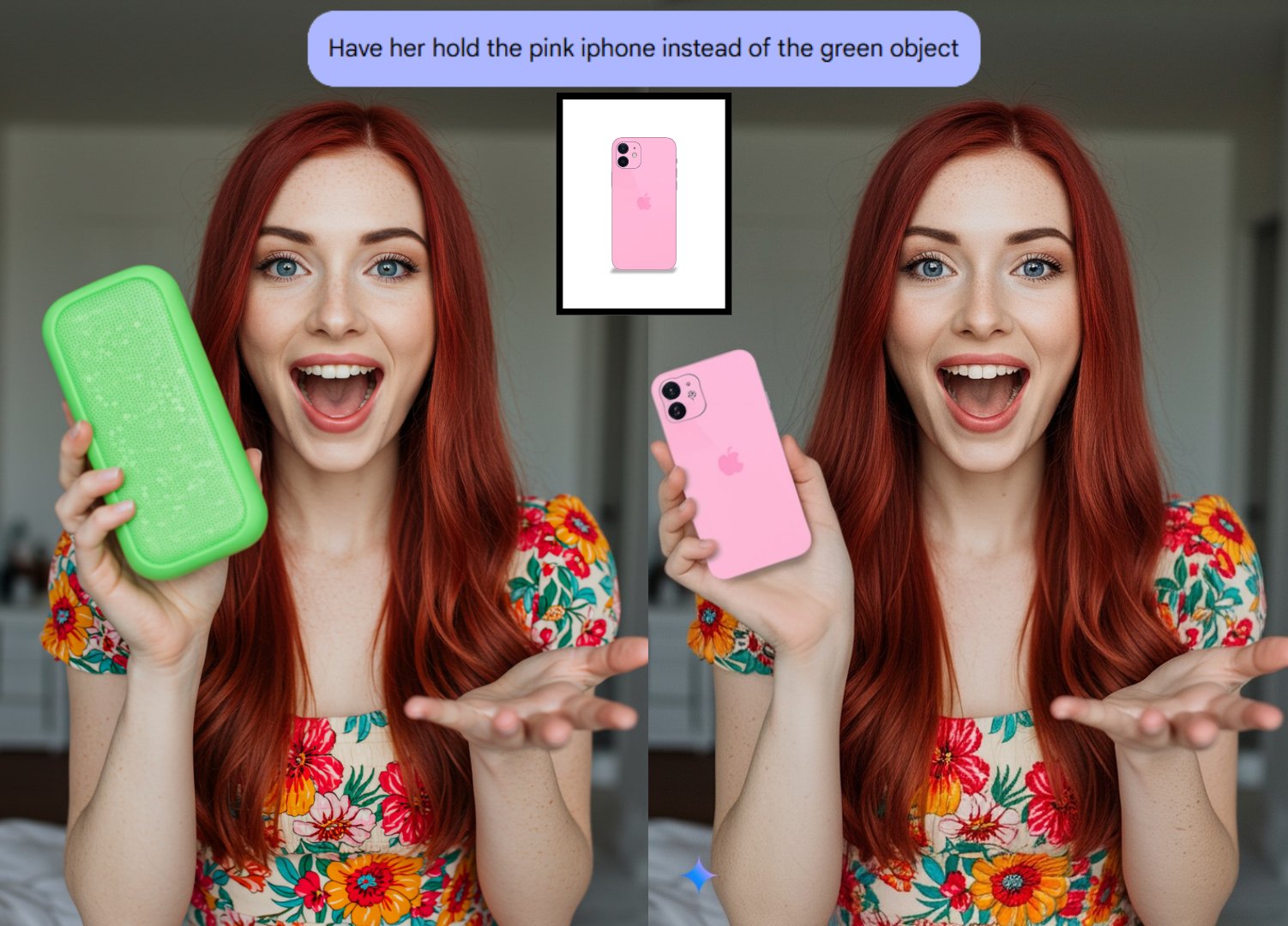
- Conversational Image Editing: Enables iterative refinement through natural language dialogue
- World Understanding: Generates contextually appropriate, realistic imagery
- Superior Text Rendering: Accurately incorporates text elements in generated visuals
Unlocking Image Editing with AI: Getting Started
Step-by-Step Guide to Use Gemini 2.0 Flash
- Access Google AI Studio
- Select Gemini 2.0 Flash (Image Generation version)
- Upload your base image
- Compose descriptive text prompts for desired modifications
Users can perform substantial edits—swapping garments, modifying hairstyles, or altering backgrounds—through straightforward text instructions.
Real-World Applications of Gemini 2.0 Flash
The technology enables diverse practical applications:
- Product Image Enhancement: Color modifications, background replacements, object manipulation
- Social Media Content: Custom visuals with integrated text and graphics
- Creative Projects: Story illustration and artistic exploration
- Marketing and Advertising: Campaign visuals and promotional materials
- E-commerce: Multiple product image variations
- Image Refinement: Watermark removal and quality improvements
Why Gemini 2.0 Flash is a Game Changer
The intuitive interface makes it easy for anyone to create and edit images. The tool democratizes visual content creation by eliminating technical barriers.
Key Benefits
- User-friendly design
- Versatile application across industries
- Time-efficient production workflows
- No advanced technical requirements
- Cutting-edge AI technology integration
FAQs About Image Editing with AI
Is it easy to use?
Simple text prompts enable image creation for all skill levels.
Can I use it for commercial purposes?
Yes, it's applicable for both personal and business applications.
What types of images can I edit?
Supports product photography, portraits, landscapes, and varied imagery.
How accurate is the AI?
Advanced AI delivers contextually consistent results.
The Future of Image Editing with AI
More sophisticated tools, deeper integration with creative workflows, and expanded creative possibilities lie ahead for AI-powered image editing.